

How To Break Windows 7 User Password
Home >> FAQ Centre >> Top 3 Methods to Bypass Windows seven Login Password and Admin Password
Top 3 Methods to Bypass Windows seven Login Password and Admin Countersign
Login password on Windows 7 could be Local account countersign and Administrator account password. So, how to bypass Windows 7 login screen without password? Is it complicated? In this post, we list 3 ways to help you bypass Windows seven countersign hands. (Read on how to bypass Windows 10 password from here)
- Method 1: Bypass Windows 7 Logon Password in Condom Mode
- Method 2: Featherbed Windows 7 Password with a Windows Countersign Reset Disk
- Method 3: Use Windows 7 Password Bypass Tool
Method 1: Bypass Windows seven Logon Password in Safe Mode
You tin change Windows seven password from rubber mode in following steps:
Step 1: Printing F8 earlier the Windows vii loading screen.
Stride 2: Cull a Windows 7 safe mode option—"Safe Mode with Command Prompt"→Printing "Enter" next.
Step 3: Blazon net user and printing Enter, all accounts on the Windows 7 PC will be displayed.
Step 4: Type your locked user account with a new password in the control prompt, for example, "Happy 123456" means your new password for net user "Happy".
Step 5: After restart your calculator, you lot now can log to your PC with the new password successfully.
(Annotation: When you recover Windows seven password from safe style, an administrator account with known password is necessary. If not, motility to Method two)
Method ii: Bypass Windows seven Password with a Windows Countersign Reset Disk
If yous created a Windows vii countersign reset disk in the past, below are the steps of how to get around forgot password on Windows vii:
one. If you enter the wrong countersign when you attempt to log on, Windows displays a message that the countersign is incorrect. Click "OK" to close the bulletin.
two. Click "Reset password", and then insert your password reset disk.
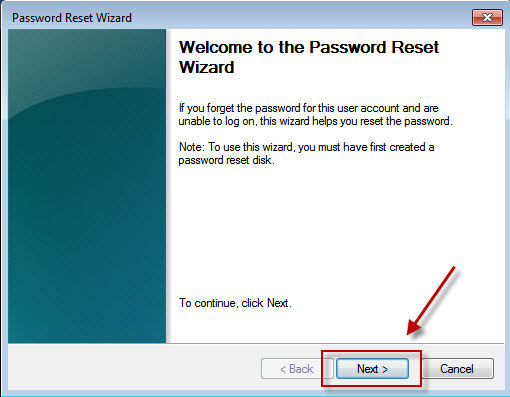
three. Follow the steps in the Password Reset Sorcerer to create a new countersign.
four. Log on with the new password. If you forget your countersign once more, you tin can utilize the same password reset deejay. You don't need to brand a new 1.
(Note: The disk only works in a sure account y'all've created, if yous inverse the Windows XP password for that business relationship, it notwithstanding works. Simply if yous don't accept a password reset deejay, and then the only fashion to bypass your Windows seven password is use a third party awarding.)
Method 3: Use Windows 7 Password Featherbed Tool
Windows Password Fundamental comes to an assistant when your computer has been completely locked without a created countersign reset disk. Someone may suggest you to reinstall the system, but I tell yous that is totally unnecessary. Windows Password Central Professional can assistance yous override your Windows 7 password and successfully login to computer again without suffering from whatever risk of data loss. Please follow the following 3 steps to get by Windows 7 password; you volition before long savour the fun with your PC.
Step one: Log in any other available calculator (not your locked ane), download and install Windows Password Key Professional.
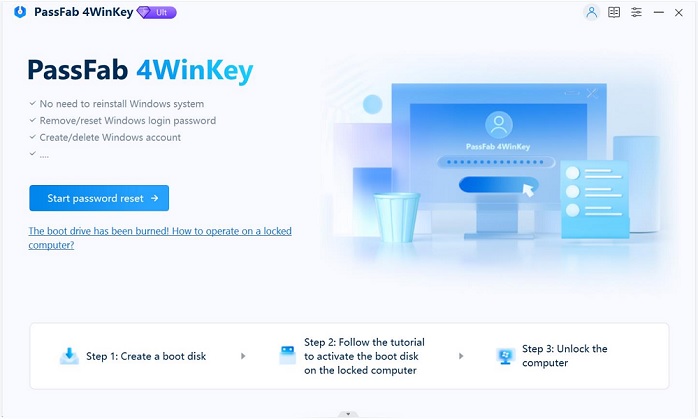
Step 2: Burn down a password reset CD/DVD or USB flash drive with the plan.
Step 3: Insert the deejay to your locked figurer and follow the software wizard to featherbed the forgotten Windows seven password with the burned CD/DVD or USB drive.
Video Guide about How to Bypass Windows 7 Account Password with Windows Password Central
Whenever yous are, if you forgot your Windows seven password, call back to make proficient employ of Windows Password Cardinal, and and so y'all can successfully and easily unlock the forgotten Windows 7 password in minutes!
Now I am sure to tell yous that it is possible to bypass Windows 7 Admin/Local password without losing any data.
- Related Articles
- How to Reset Countersign on Windows vii with USB
- How to Bypass Windows 8.1 Password
- How to Reset Password on Dell Laptop Windows 7
- How to Automatically Bypass Windows 10 Login Screen
comments powered by
Source: https://www.4winkey.com/bypass-windows-7-password.html
Posted by: morrisonsest1991.blogspot.com
0 Response to "How To Break Windows 7 User Password"
Post a Comment