

How To Open Command Prompt Windows 8 Without Password
Forgetting your Windows 8 password is definitely a daunting experience. No one, after all, can underestimate the function played by the computer in the contemporary world. This means y'all can anticipate a rather thorny experience upon password loss when yous are locked out of Windows 8. Although the situation may brand y'all break out in a cold sweat, there are a host of plausible options available on how to bypass Windows 8/8.one ambassador password. Y'all can choose to bypass Windows 8 password without software or use an appropriate tool to decipher the hurdle. However, this would solely depend on the state of affairs at hand. Merely analyse how your situation is and become the appropriate fix.
- Solution 1. Bypass Windows 8/8.1 Admin Password with Command Prompt
- Solution 2. Bypass Windows 8/8.1 Admin Password Password Reset Disk
- Solution iii. Bypass Windows 8/viii.1 Admin Password with Windows Password Recovery Tool
- Solution 4. Featherbed Windows viii Password from SAC Business relationship
- Solution 5. Bypass Windows eight Password with Offline NT Countersign & Registry Editor
Solution i. Bypass Windows 8/eight.1 Admin Countersign with Command Prompt
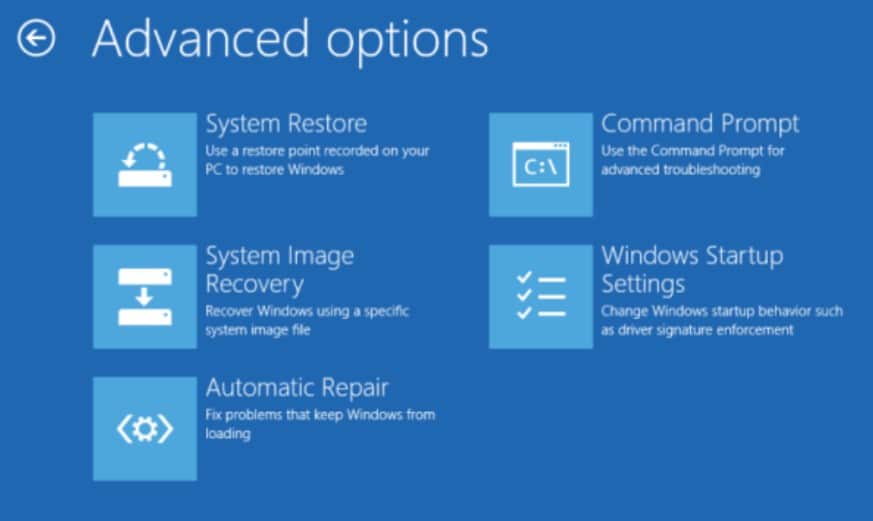
Pace 1. Get your Windows 8 recovery bulldoze and insert information technology in the Windows 8 password bypass figurer. Kicking the computer from it and click "Troubleshoot" from the subsequent menu then "Advanced options".

Stride 2. On the bill of fare that follows, select the "Command Prompt" tab and so as to open up the command prompt window.
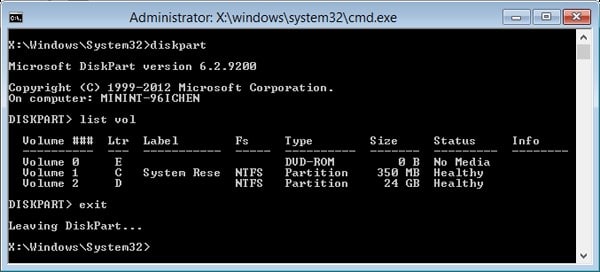
Step 3. Enter "diskpart" and then "list vol" commands successively while pressing the Enter primal. Find the windows installation partition from the listing displayed and enter "exit" to go out of the Diskpart department.
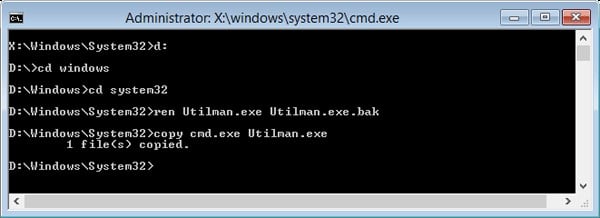
Pace 4. Now, to replace the Utilman.exe with cmd.exe, merely blazon the commands "D:, cd windows, Cd system 32, ren Utilman.exe Utilman.exe.bak, copy cmd.exe Utilman.exe" in that order while pressing the Enter primal afterwards every command. Supersede D with your Windows partition drive.
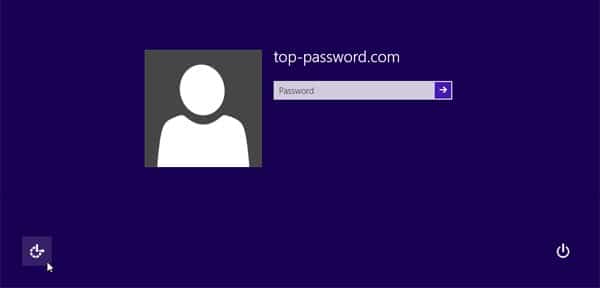
Step 5. Hit the "Ease of Access" button to open the CMD window. At present enter the command "cyberspace user" and press enter to display a listing of user accounts in your windows viii.1 password bypass computer.
Step 6. For how to bypass Windows 8 password using command prompt, just enter the command "cyberspace user user-account new-password". Primal in "exit" command and press Enter to take you back to the login screen. One time you have logged in to your Windows 8 password featherbed computer, merely rename Utilman.exe.bak to Utilman.exe.
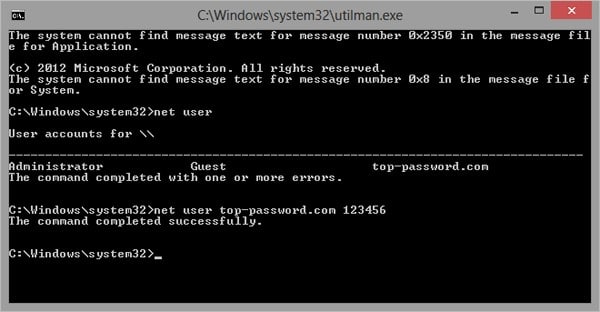
This way you will take succeeded on bypass Windows 8 password.
Solution two. Bypass Windows 8/8.1 Admin Password Password Reset Disk
Step one. Open the PC you want to perform Windows eight password bypass. Try enter a wrong password on the sign-in screen, click "Ok" on the subsequent sign-in error message, and finally click the "Reset Password" link.

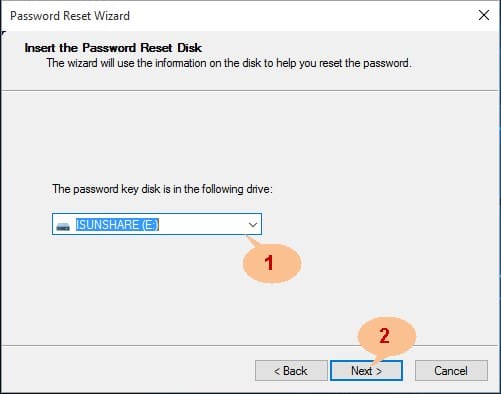
Footstep ii. When the "Password Reset Sorcerer" is displayed, insert the Windows 8 countersign reset disk in the locked reckoner and select information technology from the drop-down icon. Now click the "Next" button and do so in the subsequent windows until the "Reset the User Account Countersign" window is displayed.
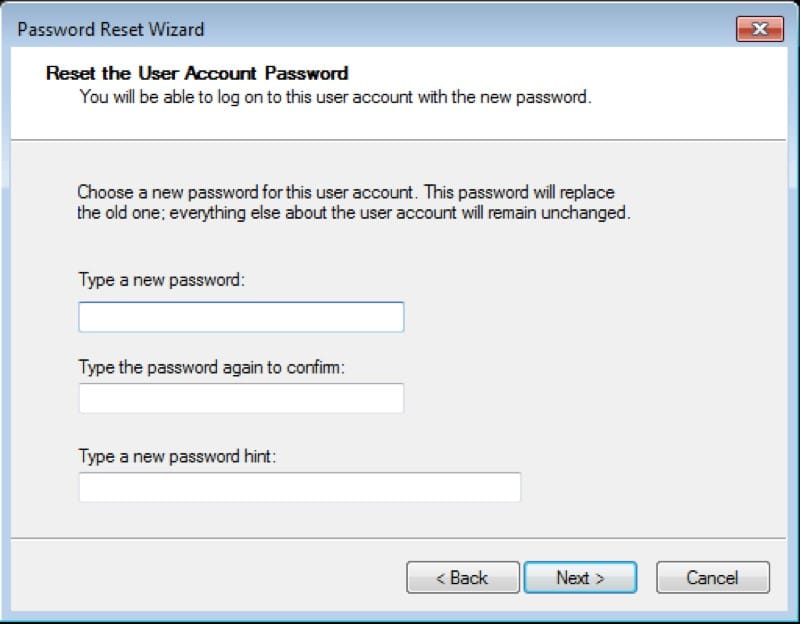
Pace 3. In the "Reset the User Business relationship Password" window, primal in your new preferred password, ostend it and provide a suitable password hint. Press "Next" to go along.
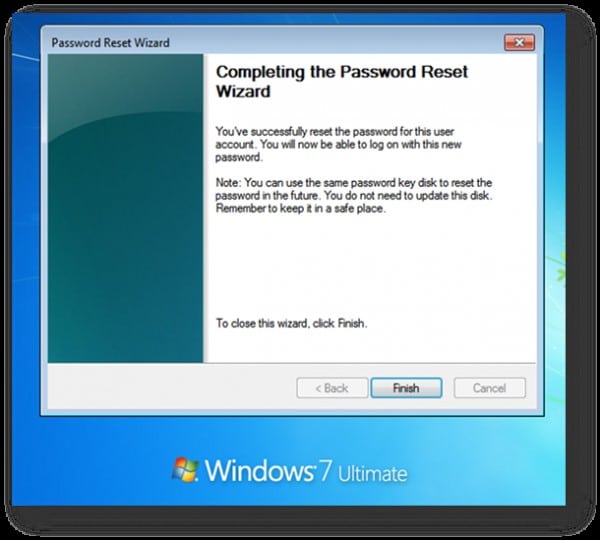
Footstep 4. The plan would then start resetting your password. When it is done, just hit "Stop" to conclude on how to bypass Windows eight countersign without software.
Solution three. Bypass Windows 8/viii.1 Admin Password with Windows Password Recovery Tool
Windows Password Recovery Tool featuring up to scratch sweeping features. The ease of apply and simple pattern makes it an invaluable tinker tool. With this tool, you tin effectively and safely bypass your Windows viii computer if locked out of Windows 8.
10,000+ Downloads
Central Features:
- It can recover forgotten countersign for all Windows in a few minutes.
- Information technology can create a new administrator account easily without logon.
- Information technology tin create USB flash bulldoze disk or CD/DVD Disc.
- Back up Windows 10, 8.i, viii, 7, Vista, XP, 2000, NT.
- Support Windows Server 2016, 2012, 2008(R2), 2003(R2), 2000, NT.
Gratis Download Buy Now
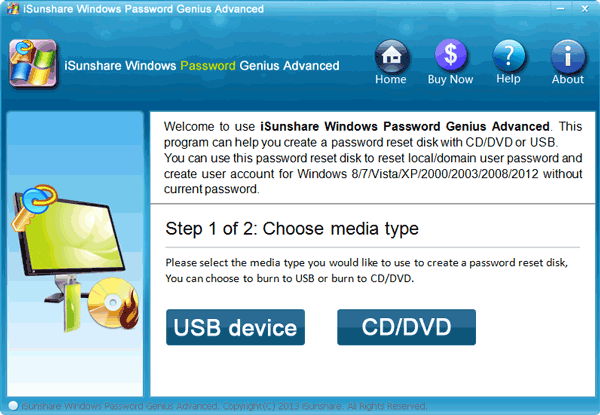
Step 1. Open another computer, install and run Windows Password Cardinal.
Step 2. Insert the corresponding reset disk in this accessible figurer. Call up you can use a USB or CD/DVD every bit your reset disk. Now click on either of "SB device" or "CD/DVD" button, of grade, depending on the inserted reset drive.
Step 3. Under the driblet-down push button, select the respective reset disk and click the "Begin called-for" button just abreast it. Click "Yep" in the pop-up window to confirm the burning process. Once the called-for process is successful, a notification shall pop-up. Simply click "Ok" and become the reset disk out and into the locked windows 8 password bypass computer.
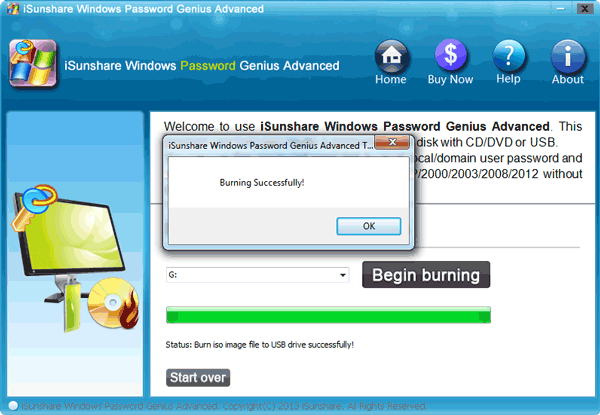
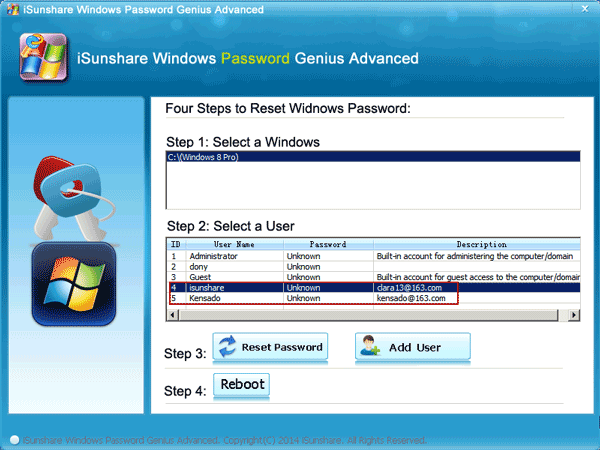
Step four. At present boot the locked estimator from the inserted reset drive to open the Windows Countersign Cardinal. Select the target user account from the list displayed and hit the "Reset Password" push. From the subsequent popular-up prompting whether to set the countersign to nothing, just select "Yeah" to proceed.
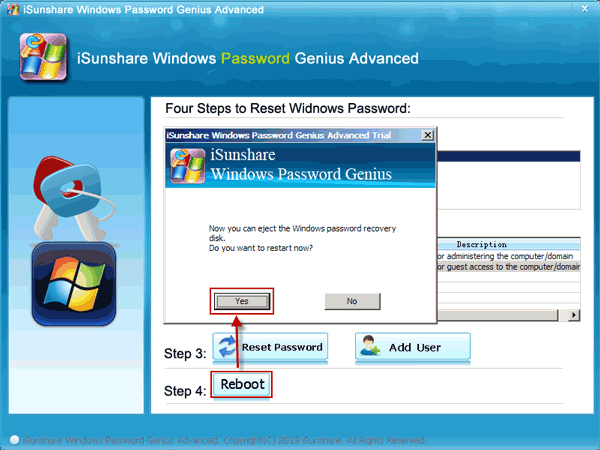
Pace five. Finally, printing the "Reboot" push at the bottom of the window to complete on how to featherbed administrator countersign for Windows eight. Call up to squirt the reset disk before the Windows 8 password bypass computer restarts.
Solution 4. Bypass Windows 8 Password from SAC Business relationship
One of the best ways for Windows eight countersign featherbed is by SAC account. The SAC account stands for Super Administrator Account, this type of accounts are available for Windows 7 or the later on version of Windows accounts. These type of accounts come up with Admin rights and they are mainly used to reset the passwords for locked Windows 8 Administrator accounts.
Hither's how to featherbed Windows 8 countersign using a SAC account:
Step i: Open your figurer and expect for the login screen to announced.
Step 2: Then, tap the "Shift" key on your keyboard five times and the SAC account will appear on the screen.
Step 3: Click on the SAC business relationship and you will get admission to your Windows PC.
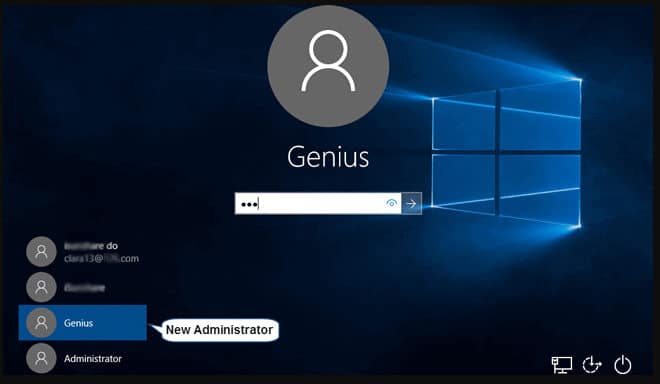
Pace 4: Inside the SAC account, click on "Start" and navigate to "Control Console" and click on "User Profile".
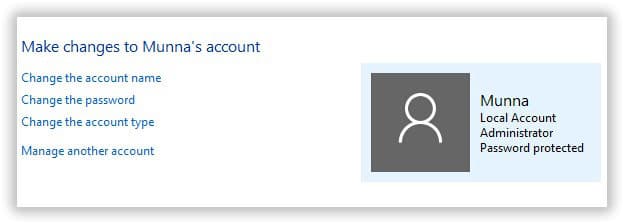
Step 5: In the "User Profile" click on your main Ambassador account and alter the password.
Step vi: After the password modification is consummate, reboot your PC.
Step 7: Then, sign in to your chief account but this time use your modified countersign to get access to your chief account.
This is a unique and constructive way to bypass the password for a Windows 8 business relationship but you need to remember that this SAC feature is non available on older version of Windows Os.
Solution 5. Bypass Windows eight Password with Offline NT Countersign & Registry Editor
Offline NT Countersign & Registry Editor is some other tool for Windows 8 password bypass; but it works in a completely different way than the SAC account. The NT Password & Registry Editor does not actually removes the password merely it completely eliminates it.
Unfortunately, the procedure is very complicated and text based. So, it may be effective but most of the users tries to avoid it. Nevertheless, here are the bones steps:
Step one: Yous demand to download the Offline NT Password & Registry Editor from its website on a different computer.
Step 2: the downloaded file will be an ISO file and you need to fire it on a USB drive or on DVD. Nosotros prefer using USB.
Step 3: Subsequently the file is burned on a USB drive, connect it to the locked computer and reboot.
Step 4: The program will load on your figurer and you need to follow the on screen instructions to remove the password.
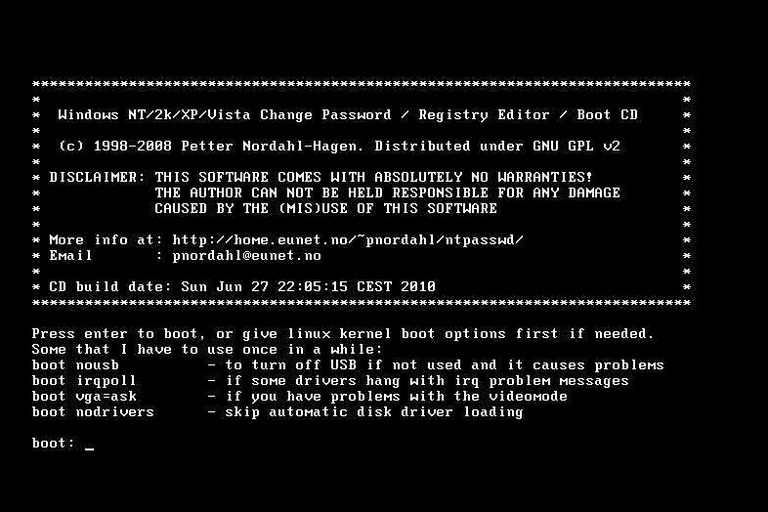
Pace 5: But in the final pace you lot demand to select "Clear or Blackness Password" and quit.
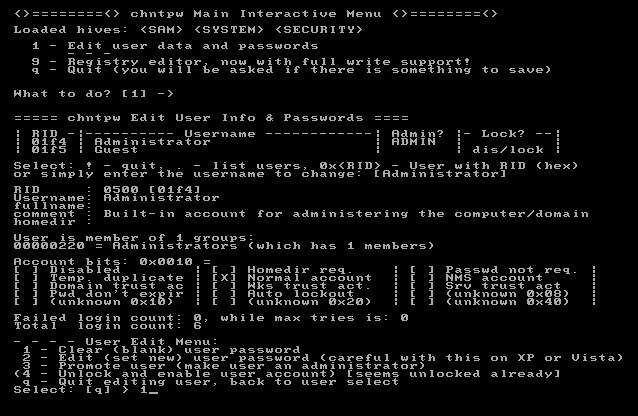
If you follow this procedure the password for your locked Windows 8 business relationship volition be eliminated and y'all will be able to access your Windows account again, without a countersign.
Decision
From the aforementioned solutions, it's definitely clear that in that location exist a variety of up to par solutions to bypass Windows 8 countersign if locked out. However, it is crucial to invoke the appropriate solution. Windows Countersign Recovery Tool is no incertitude the cherry on pinnacle. Download, install and effort out this tool to become that astonishing user-experience.
Complimentary Download Buy NowSource: https://www.winpasskey.com/how-to-bypass-windows-8-8-1-admin-password-if-locked-out/
Posted by: morrisonsest1991.blogspot.com
0 Response to "How To Open Command Prompt Windows 8 Without Password"
Post a Comment